Ordinary browsers are built for one person looking at one tab. Embiody is built for agents that work while you do something else.
01
Full speed in the background. Your screen stays yours.
Pages keep running at full speed in background tabs, in windows hidden behind other windows, and in minimized or hidden windows. The agent's clicks and typing never pull the browser in front of you.
So your agent can work on a dozen tabs at once while you keep using your computer.
Tabs the agent opens from its own tabs stay with the agent.
Hide the browser to the system tray with one button; the agent keeps working.
Measured
Browser window fully covered by another window for 7 minutes, with a countdown running on the page.
≤ 1 s
Embiody: countdown behind, in front and background tabs
355 s
Regular Chrome: countdown behind (slowed down after 12 s)
Embiody 0.9 vs Chrome 156, Windows, October 2026.
02
Works where bots get blocked — because it isn't one.
Your agent works in your own browser, on your behalf, so sites with anti-bot protection treat it the way they treat you.
And because it is your browser on your PC, your agent works with the sign-ins you already have.
Tested
Same task, same moment: Walmart, Target, adidas and realtor.com stop Playwright MCP with a bot check. Embiody goes straight through.
We also signed in to an account on a site protected by a leading commercial bot-detection service, the kind that usually stops automation tools.
03
Sees the whole page. Clicks the right thing.
With other tools, an ad or pop-up covering the page leads to wrong or failed clicks. Embiody filters at the engine level, so your agent only sees what it can actually click.
Reads and clicks inside embedded frames from other sites, such as payment and sign-in forms.
Reads long pages in full.
Scrolls an element into view before clicking it.
Stays accurate across multiple monitors, display scaling and page zoom.
Rejects out-of-date element references instead of clicking the wrong thing.
04
You can always see what the agent is doing.
Tabs under agent control show a virtual cursor, a highlighted page border and a badge on the tab. Open one and watch the agent work.
05
Work side by side in the same tabs.
Your agent fills in the forms; you step in for the sign-in, the captcha, the payment or the file to upload, then hand the tab back. No copying links between windows, no starting over: the agent picks up exactly where you left off. Touch a tab the agent is using and Embiody asks whether you want to take over; before the agent touches one of your tabs, it asks first.
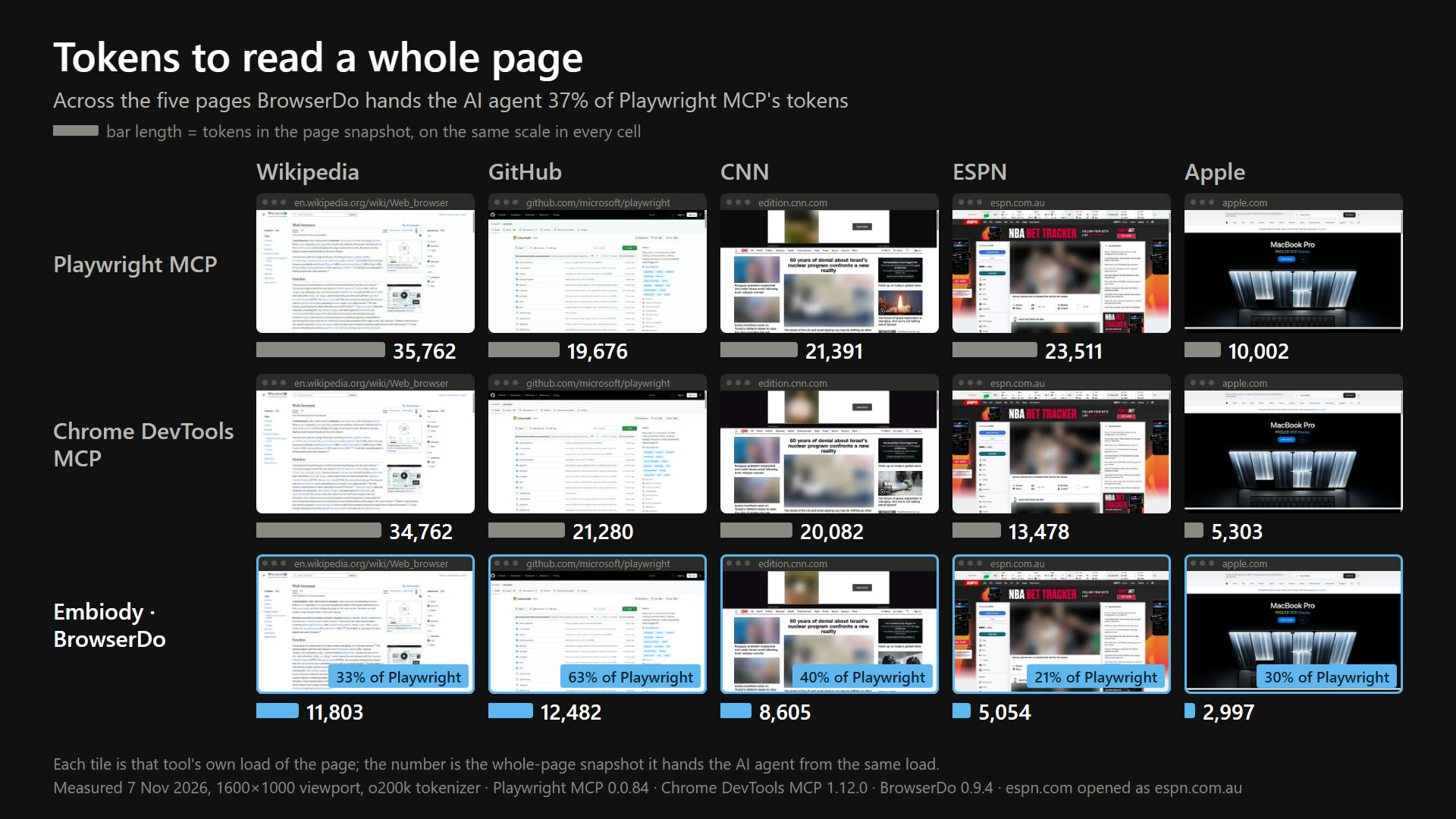
The browser engine itself boils each page down for the agent: its text, plus every element the agent can act on, numbered. A whole page takes less than half the tokens of Playwright MCP or Chrome DevTools MCP, and the agent can read just the screen it is working on. Measured on Wikipedia, GitHub, CNN, ESPN and Apple, November 2026.
07
Combos: many steps, one call
Click, type and press keys in a single call, and get the updated page straight back. Fewer round trips: your agent works faster and uses fewer tokens.
08
Reads the page's own text
Not a summary: the page itself, including pages built by scripts and sites you are signed in to. A drop-in replacement for Claude Code's built-in WebFetch. A 231,000-character documentation page reads in full in under 2 seconds.
09
Sees the browser's own pop-ups
Permission prompts, menus, Save As, “Leave site?”, alerts and dialogs are all reported to the agent, together with how each one can be handled.
10
Current engine, properly shipped
Built on Chromium 156. Digitally signed installers. Automatic updates with signature verification.
Install
Just tell your agent: “Find BrowserDo MCP and install it.” Most agents can do it themselves. BrowserDo is our open-source MCP server (Apache-2.0): through it your agent works in Embiody, which runs on Windows 10 and 11.
1
Add BrowserDo
Ask your agent as above, or add it yourself with one of the snippets below. Adding it yourself needs Node.js 20 or newer (if you don't have it: winget install OpenJS.NodeJS.LTS, then restart your agent program).
2
Get the browser
BrowserDo downloads and installs Embiody the first time it runs. Or download the installer yourself.
3
Ask your agent
“Use BrowserDo to search for BrowserDo Embiody and give me the three most recent results.” If results come back, BrowserDo is installed and working.
Claude Code
claude mcp add browserdo -- npx -y browserdo-mcp
Claude Desktop
Settings → Developer → Edit Config, add to claude_desktop_config.json, then restart Claude.
In WorkBuddy: 「专家·技能·连接器」→「连接器」→「自定义连接器」→「添加 MCP」. Paste this and save. WorkBuddy brings its own Node.js. If the first connection shows a yellow dot, click refresh.
In Doubao Work: 「插件·技能·工作台」→「添加」→「新建自定义连接器」. Set the transport type to STDIO, the command to npx, and add two arguments, one per row: -y and browserdo-mcp. Doubao Work brings its own Node.js.
npx -y browserdo-mcp
QwenWork
In QwenWork: Skills & extensions → Connectors → Add → Paste JSON Config. Paste this, then Import.
Add a local (stdio) MCP server with command npx and arguments -y browserdo-mcp.
npx -y browserdo-mcp
How BrowserDo compares with Playwright MCP, and all its tools: the BrowserDo page.
FAQ
Is it Windows only?
For now, yes: Windows 10 and 11. Whether Mac and Linux come next depends on demand. If you need one, tell us on r/Embiody or GitHub Discussions.
Is it free?
Yes. The Embiody Browser is free to use, including commercially, under our license agreement. BrowserDo is open source under Apache-2.0. We may offer paid editions in the future; they would come with their own terms.
What data does it send to Embiody?
Very little. There are no accounts, and we don't collect your name, email, browsing history or page content. The updater tells our update server which version you run so it can offer updates; it sends no persistent user or device identifier, and our server doesn't record your IP address. BrowserDo has no telemetry. Chrome's Google services are turned off; Google is only the default search engine, which you can change. Full details are in our Privacy Policy.
Where does page content go when my agent reads a page?
Only to the agent program that asked for it, on your computer. What that agent sends on to its AI provider is up to the agent and the provider.
Can other programs on my PC control the browser?
Yes, and you should know this. Embiody is made to be driven by agents, so while it runs it accepts control connections from programs on the same computer (never from the network). Only run programs you trust. This is the same as other software that lets programs control a browser. If you have specific security needs, tell us on r/Embiody or GitHub Discussions.
Does it work with my agent?
If your agent supports MCP (the Model Context Protocol, the common way AI agents plug in tools), yes. See Install for ready-to-paste snippets.
What does “preview” mean?
Version 0.9 works, but it is early. Expect rough edges and frequent updates. Bug reports and ideas are very welcome on r/Embiody or GitHub Discussions.
About
Founder Junlong Zhai previously founded CoolNovo (aka ChromePlus), a browser that grew to tens of millions of users with an excellent reputation. A team with years of browser and AI software experience, passionate about building the browser that fits AI agents best.
AI agents can already reason, write and plan. What holds them back on the web is the browser: built for one person looking at one tab, it slows down pages the agent is working on, gets them blocked as bots, and fights the user for the screen. Embiody is a browser made for the agent and the person to share.
Studio
Embiody Studio, a trading name of SELECTIOUS PTY LTD (ABN 17 674 161 249)
 Embiody
 Official MCP Registry
 awesome-mcp-servers
 Glama
 MCP Market
 mcpservers.org
 mcprush
 LobeHub
 freemcp.space